# Install and configure Docker Toolbox before Windows 10
Note: From Windows 10, Docker Toolbox run only if Hyper-V is stopped. Command to stop Hyper-V:
dism.exe /Online /Disable-Feature:Microsoft-Hyper-V
Docker Toolbox is compatible for Windows system before Windows 10.
The documentation is available here.
# Share host directory
Create a new folder C:\Comonway before following stages:
- Open Oracle VM Virtualbox
- Select the
defaultvirtualbox - Select
Configurationbutton - Go to
Shared Folder - Update the existing Folder with
C:\andcfor the dir name
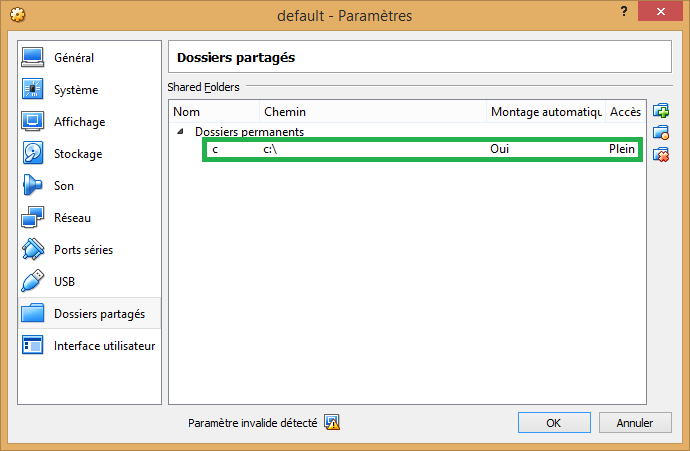
Update Virtualbox share folder simlink with
VBoxManage.exe setextradata VM_NAME VBoxInternal2/SharedFoldersEnableSymlinksCreate/SHARE_NAME 1
where:
- VM_NAME: Name of the VM, example default
- SHARE_NAME: Name of the shared folder in Virtualbox
You system is ready.
# Resize Docker machine hard drive size
Docker Toolbox Boot2Docker hard drive default size is 20GB. We recommand to resize space depending your hardware.